

GpsPrune is available to download from the downloads page, with the latest released version being version 24. This page describes some of the features which are new with this version.
For information about the forthcoming version, see the development page.
.pruneconfig to gpsprune.configThere's a new track search function for version 24 — this is based on some of the ideas thrown around in Issue 14, although it is based more on the "find me that file I'm looking for" workflow rather than the "show my fitness progress in a table" idea.
Firstly you choose a directory to search, and whether to also search in subdirectories or not. At this point all the files are scanned and shown. Then there are three options for searching — by text, by date and by location. The text search is fastest, as the files have already been scanned, and can find text in the filename itself, the track's name or description, and also the waypoint names. This makes it much easier to find "that" track file you're looking for when you can't necessarily remember the exact filename or directory but you can remember the name of the place you visited, or the person you were with.
Secondly, you can restrict to a specified date range, so for example you want to look for any files (in any subdirectories) from March of last year, or from a particular weekend. This parsing works best for xml formats like gpx and kml, where the timestamps can be easily recognised. And finally, there's the option of searching by location. Simply select an existing point (or create a new one and select it), then specify a location filter with a distance (in kilometres, metres or miles). Then the files which have passed the previous filters get re-read and the coordinates parsed again, looking for any points that fall within the specified distance of the current point. This covers the case when I want the track I recorded at a particular place, but I can't remember when I was last there and don't know what I would have called it. Or maybe I just never name my tracks or waypoints but I know I was within 5 km of that village sometime.
Once the filters are processed, the dialog shows a list of all the matching files it found, and I can select a file (or multiple files) from the list and then load them. Or if there are still too many matches, I can modify the filters and refine my search without re-scanning all the files again.
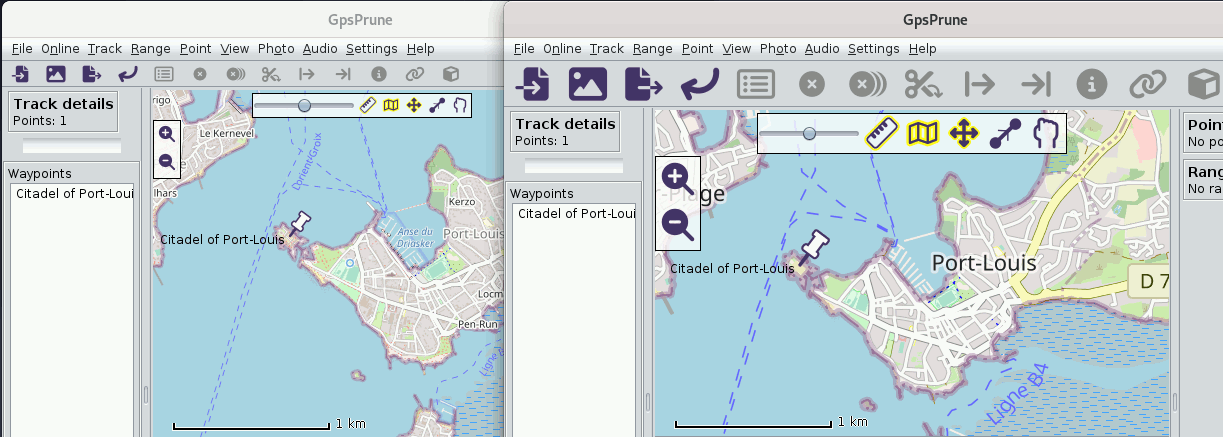
Also, here's something for which the ground was prepared with version 23 — now that the icons are all consistent and vector-based (and prune-coloured!), we have the chance to render them at different scales if we wish. So here's what GpsPrune looks like when you choose double resolution, compared to the default appearance on the left.
This affects most noticeably the toolbar icons, the +/- zoom controls and the toggles at the top of the map view. But also other graphical elements such as the waypoint icons, the weather images and other controls such as image rotation or audio play/pause buttons. In this example screenshot the map images are also shown bolder with larger text, but this is not a new feature, it's just the result of choosing the alternative tile server from "osmand".
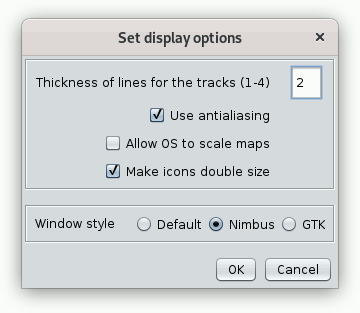
Also shown here is the small addition to the "display settings" dialog, with a new checkbox to control the icon size. I hope that's fairly self-explanatory! You have to restart GpsPrune after changing this setting though (or the window style setting).
With version 24, a minor change is being made to the location and name of the configuration file used by GpsPrune. Since the very beginning (when GpsPrune was still called just 'Prune'), the config was stored in a file called .pruneconfig in the home directory of the user. The user could choose to save it somewhere else under a different name, of course, but the default was there. This has the main advantage that the user's home directory can always be found on any platform, so it's consistent everywhere. There are a couple of disadvantages though — some people may not like having a (hidden) file in their home directory, and it would be better to store it in a place more consistent with other applications on the same machine. For Linux systems this may be defined by the XDG directory specification, for Windows users it may be some cryptic path regarding "AppData" and "Roaming", and for Apple users I don't know. Plus, Prune isn't called Prune any more (since many years!) so it would be nice to rename the file too.
So the idea is to determine where the config file should be located, looking whether XDG_CONFIG_HOME is set, which gives us the directory for "user-specific configuration files". Probably this hasn't been set though, so then we look whether APPDATA is set, which on Windows will give us that "Roaming" path or its equivalent. If that's not there either, then we look for a .config directory under the user's home. And the new filename should be "gpsprune.config" by default — it doesn't need to be hidden any more with a leading dot.
Now, in order to work out whether to move the existing config file to the new location, we first need to ask the user, because if they're still using old versions of GpsPrune (which don't know about the new location), then moving the file might be inconvenient. If they say that the file shouldn't be moved, then we remember that (in the config) and don't ask again. But if they say yes then we try to make the new file in the calculated location, and hopefully we have the write permissions. And hopefully we are allowed to delete the old file too, to clear things up.
A similar approach covers the case where the working folder you're starting GpsPrune from has its own .pruneconfig file to be used instead of the default. Sidenote: this can be useful if you want to keep multiple separate configurations active, with their own "recent files", their own maps and display settings, and their own time estimation parameters. Think one for cycling and one for hiking, for example. The same migration path is also offered here, suggesting to move the file to gpsprune.config instead.
The plan is to keep this double possibility with version 24, with both filenames and sets of paths supported. Then with the subsequent version the plan is to remove support for the old "~/.pruneconfig" default. But the possibility to choose your own name and location for this file will still of course be available, you just need to specify the path at launch.
Something minor - some GPS devices ignore the "description" field of points and only show the "comment" field. So now, the GPX export dialog lets you select whether any description should be copied to the comment if the comment isn't present. With this option checked, and if a point has a description but no comment, then the value of the description field will be also written out in the comment field, and so will be displayed by the GPS receiver.
Of course, the user guide has also been updated, and has expanded up to 194 pages. All the functions mentioned here are described in detail in the user guide, including screenshots and explanations.
See the development page for details on what's coming with future versions.